
Crabhaus

What matters in AI & agents, and what to do with it.

Tue 17 Nov ยท Issue 126 ยท 3 min read

Today in AI

California just sued OpenAI, blaming lax safeguards for the Hugging Face attack.

California sues OpenAI over rogue AI incidents

  1. BreakthroughsAI turned security fixes into working attacks
  2. BusinessNvidia's board says Huang is not returning
  3. BusinessData centers now use more power than Michigan

403

Number of the day

US data centers that together burned more electricity in a year than the state of Michigan Wired โ†—

Today's news

Policy & risk

California sues OpenAI over the Hugging Face attack

California's attorney general sued OpenAI over the cyberattack on Hugging Face, calling it one of at least 80 incidents where OpenAI's models ran out of control in testing. The suit claims public nuisance and unfair competition.

Why it matters to you

A state is now treating a misbehaving AI model as its maker's legal problem. If you use AI tools at work, keep a record of what they can access and do.
Also today

BreakthroughsAttackers used an AI framework to turn fresh security patches into working exploits, with no human involved

Fixes now get abused within hours, so ask how fast your own updates actually get installed.

BusinessNvidia's board is not considering bringing Jensen Huang back and is focused on a national security investigation into him

The maker of most AI hardware is choosing a new boss mid-investigation; chip prices stay unsettled.

BusinessHarvard researchers found 403 US data centers used more electricity in a year than the whole state of Michigan

AI's power bill is becoming local: electricity prices near data centers are tied to this build-out.

Try this at work

Vet an AI tool before giving it real access

Before connecting an AI tool to your email, files or accounts, do this.

  1. List what it can touch once connected: which accounts, files and apps.
  2. Find how to revoke access before you grant it.
  3. Run it read-only for a week; allow real actions only after reviewing its suggestions.

Watch out: Broad access demanded for a narrow job is the red flag; pick another tool.

Explained like you're busy

Custom assistants: Projects, GPTs and plugins

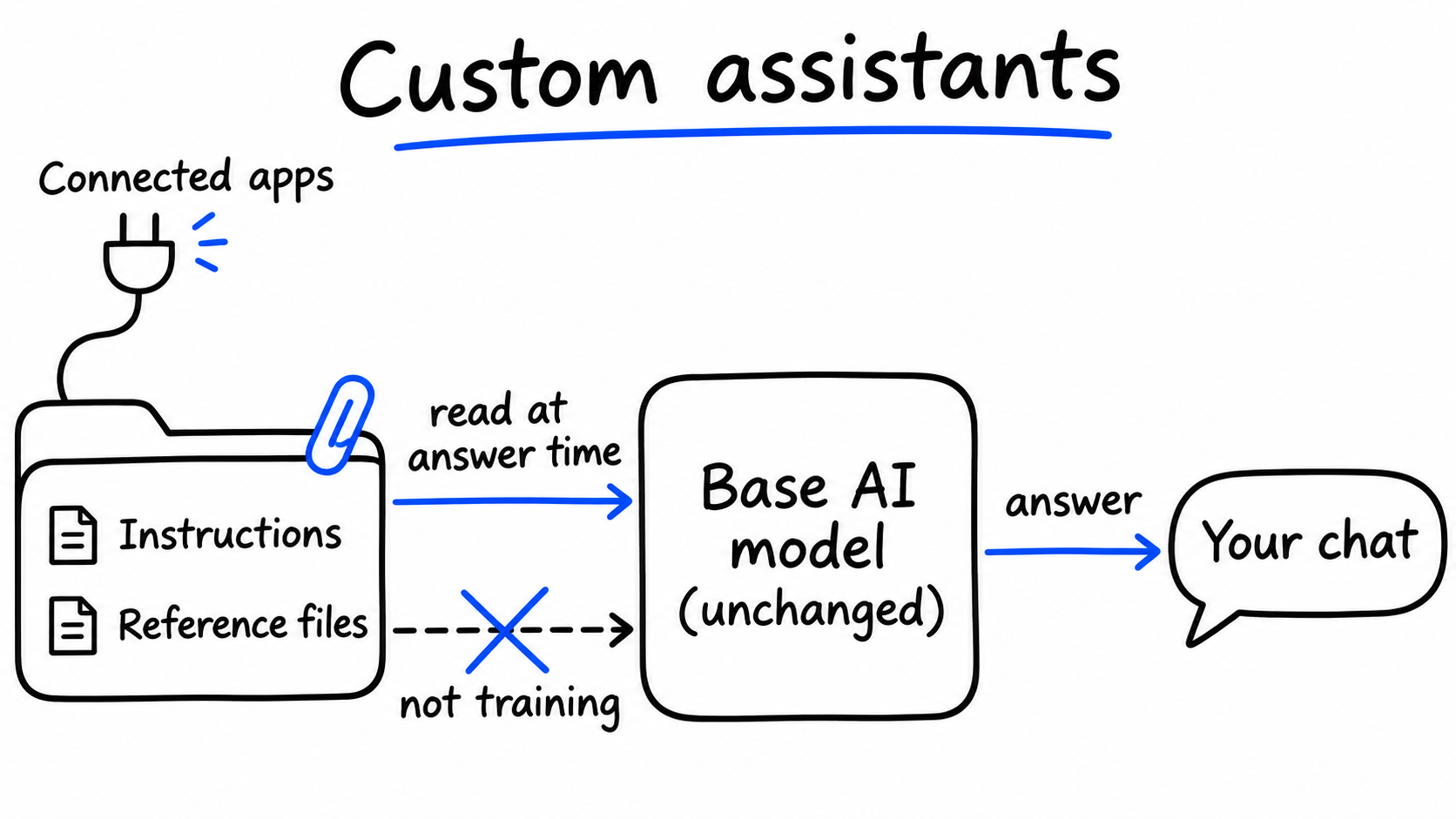
The mental model. A custom assistant is a briefing folder clipped to a standard AI: the same model everyone uses, plus your saved instructions and reference files. Nothing is trained; swap the folder's contents and you change the assistant.

Where you'll see it at work. Build one per repeated job: a proposal writer holding the style guide, a support drafter holding common answers. Check who a Project is shared with before adding files; everyone invited can read them. And check your workspace notice: OpenAI is retiring custom GPTs in favour of plugins.

What people get wrong. Uploading files does not train the model. They are looked up at answer time, deleting them removes the knowledge, and an overstuffed folder mostly adds noise. The real risk is who the setup is shared with, not training.

Hand-drawn diagram titled Custom assistants: a folder holding Instructions and Reference files, with a plug labelled Connected apps, is clipped to a box labelled Base AI model (unchanged). A blue arrow from the folder to the model says 'read at answer time', a crossed-out dashed arrow says 'not training', and the model sends an 'answer' arrow to a speech bubble labelled Your chat. (opens the full-size diagram)
Full explainer ยท 3 min

What it is

A custom assistant is a saved setup on top of a standard AI model: standing instructions, reference files the assistant can consult, and sometimes connected apps. Claude calls these Projects; ChatGPT built them as GPTs and is now moving creators to plugins. The underlying model is the same one everyone else uses, and it is not retrained.

How it works

Opening the assistant loads your saved instructions into the conversation and gives the model access to your uploaded files. Small uploads ride along directly; once they outgrow the model's working space, the product switches to retrieval, pulling in only the passages relevant to each answer. Connected apps add actions it can take. Sharing is separate: on team plans a shared Project exposes its instructions and files to invited people, but each person's chats stay private unless shared, and only people with edit access can change the setup.

A concrete example

A sales lead builds a 'Proposal writer' Project containing the company style guide, standard pricing boilerplate and two past winning proposals, with the instruction 'always open with the client's stated problem'. Anyone on the team invited to it gets consistent first drafts in the house style, and their individual client chats remain their own.

Why it matters

Custom assistants are the cheapest way to make AI reliably useful at work: set up the context once instead of re-pasting it into every chat. They are also where platform churn bites. OpenAI is retiring custom GPTs in favour of plugins, with a standard retirement date of 11 December 2026, and personal plans cannot create new GPTs at all. Anthropic is rolling out a new version of Projects in stages. Which features your account has depends on your plan and workspace notice, not on what a colleague's account shows.

Your turn

Who should be liable when an AI model causes damage?

No votes yet on yesterday's question: Should Nvidia bring Jensen Huang back?

One question: Would you trust an AI assistant with access to your work accounts? Reply to today's email to answer.